

In this tutorial, we will cover data synchronization with iTop and see how to adapt it to a specific need thanks to data collectors.
We will use the open APIs available on https://api.gouv.fr/ in order to synchronise national education institutions with our iTop server.
You can later collect more data using other APIs of the website.
This site references public service APIs, made available to local authorities, government departments and companies to build IT services for everyone.
api.gouv.fr

⏱️Approximate duration of the tutorial: 4 hours
Key steps in this tutorial
1/ Data structuring
2/ Creation of an iTop extension
3/ Creation of an iTop data collector
4/ Industrialisation of the solution
5/ Exercise
6/ Quizz
Prerequisites
An iTop community server version 2.7 or higher installed locally or on a remote machine on your network with user rights to make changes on setup.
A PHP runtime environment compatible with the iTop version and some knowledge of PHP.
A text editor like Notepad++ or similar.
Principle of synchronisation with iTop
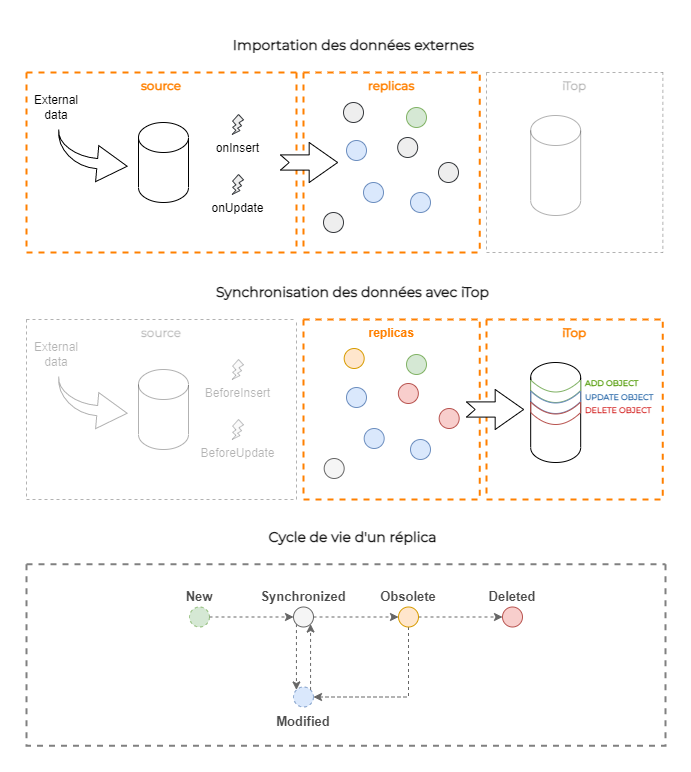
The role of the collector is to convert external data to CSV format, to update the replicas with this data and finally to synchronise them with iTop data.
An abstraction layer handles the import and synchronisation phase for us.
For our specific REST collector, we simply need to extract data from the API and convert it to CSV.
Tutorial steps
1/ Data structuring
We would like to synchronise the list of French national education institutions with iTop. The data will be read-only on the iTop side.
We will use the Education Directory API: https://api.gouv.fr/les-api/api-annuaire-education.
The analysis
The first step consists of analysing the API and identifying the data we want to upload to iTop.
By going to the API overview page, we can see the main data available.
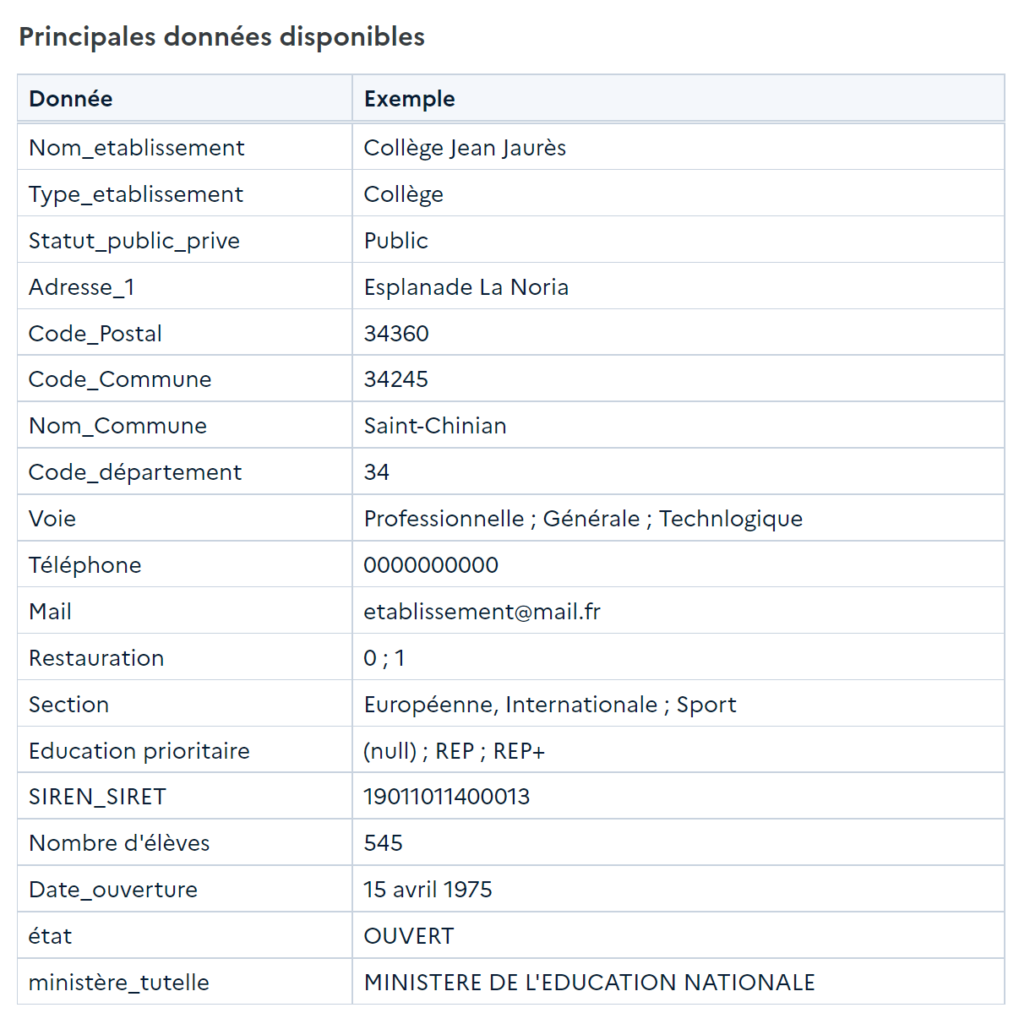
Selection of data to be synchronised
We select the following information from the institutions:
· Unique identifier (UAI)
· Name
· Mailing address
· Type of institution
· Public or private information
· Academy code
· Number of pupils
· Availability of a catering service
· Open date
Several data types (text, number, date, enumeration and Boolean) will be synchronised.
Data source
The API request we will use is as follows:
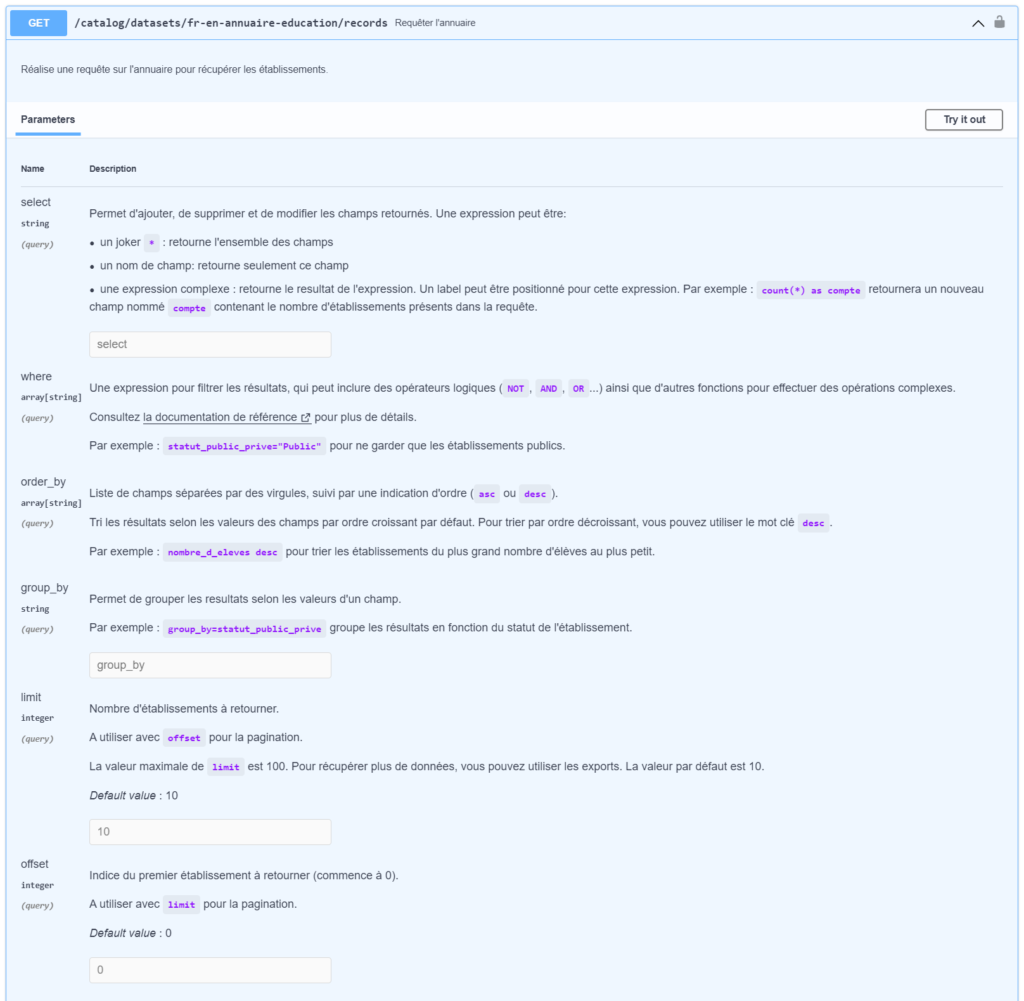
GET /catalog/datasets/fr-en-annuaire-education/records
We will use select, limit and offset parameters in order to select only the data we are interested in, so that we can go through all the records in several iterations. It is indeed impossible to select all the institutions, as the limit of the number of results set by the API is 100 institutions per query.
You can run some tests to get familiar with the API here : https://api.gouv.fr/documentation/api-annuaire-education.
2/ Creation of an iTop extension
We will create an extension to allow us to customise the iTop data model and thus be able to collect data from educational institutions. We will extend the location class and add specific information for national education institutions. We will also be making some changes to the iTop side menu to accommodate the menus associated with the api.gouv.fr APIs.
Skeleton generation
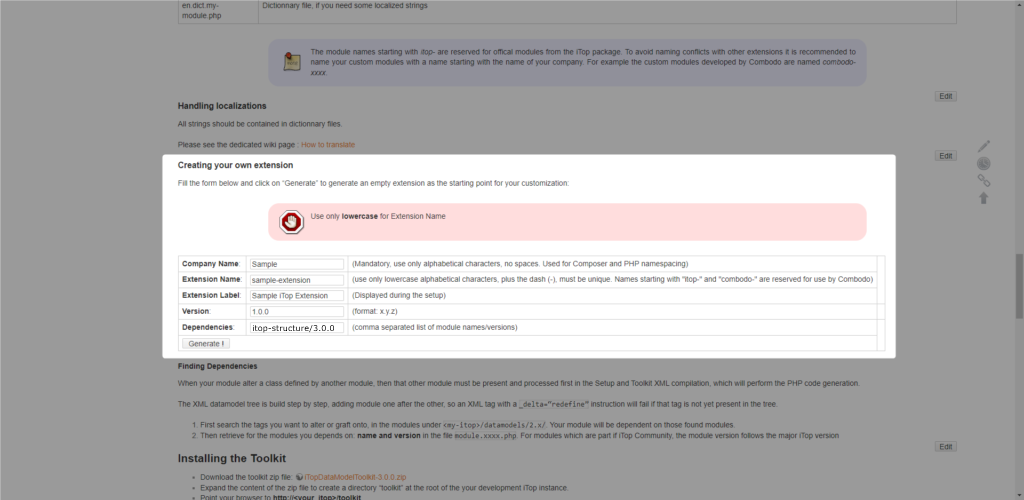
Start by generating an extension skeleton by entering the following information in the creation form.
Click on the button Generate and then download the generated archive.
Unzip the downloaded archive into the extensions folder on the iTop server.
Company name: MyCompany
Extension name: gouv-api-extension
Extension label: api.gouv.fr data synchronisation
Version: 1.0.0
Dependencies: itop-structure/3.0.0
To go further in the creation of extensions, visit the official documentation.
Creation of the data model class
We will create our class to store school information. We choose to derive the class Location to inherit the location data.
General information
Initializing the class Establishment which derives from the class Location.
Add the general class information to the data model file as follows:
datamodel.gouv-edu-extension.xml
<itop_design xmlns:xsi="http://www.w3.org/2001/XMLSchema-instance" version="1.6">
…
<classes>
<class id="Establishment" _delta="define">
<parent>Location</parent>
<properties>
<category>bizmodel,searchable</category>
<abstract>false</abstract>
<key_type>autoincrement</key_type>
<db_table>establishment</db_table>
<db_key_field>id</db_key_field>
<db_final_class_field/>
<naming>
<format>%1$s</format>
<attributes>
<attribute id="name"/>
</attributes>
</naming>
<display_template/>
<icon>assets/img/school.png</icon>
</properties>
</class>
</classes>
…
</itop_design>
💡The tag <icon> allows you to associate an image with the class.
Adding attributes to the data model class
Declaration of the attributes of the Establishment class. For each of these attributes we specify its data type xsi:type="AttributeXXX".
All attributes identifier, type and private_public are set as mandatory.
Add the attributes of the class to the data model file as follows:
datamodel.gouv-edu-extension.xml
<classes>
  <class id="Establishment" _delta="define">
  …
    <fields>
      <!-- identifier-->
      <field id="identifier" xsi:type="AttributeString">
        <sql>identifier</sql>
        <default_value/>
        <is_null_allowed>false</is_null_allowed>
      </field>
      <!-- type -->
      <field id="type" xsi:type="AttributeString">
        <sql>type</sql>
        <default_value/>
        <is_null_allowed>false</is_null_allowed>
      </field>
      <!-- private_public -->
      <field id="private_public" xsi:type="AttributeEnum">
        <values>
          <value>unknown</value>
          <value>private</value>
          <value>public</value>
        </values>
        <sql>private_public</sql>
        <default_value/>
        <is_null_allowed>false</is_null_allowed>
        <display_style>radio_horizontal</display_style>
      </field>
      <!-- academy_code -->
      <field id="academy_code" xsi:type="AttributeString">
        <sql>code_academie</sql>
        <default_value/>
        <is_null_allowed>true</is_null_allowed>
      </field>
      <!-- catering_service -->
      <field id="catering_service" xsi:type="AttributeBoolean">
        <sql>catering_service</sql>
        <default_value/>
        <is_null_allowed>true</is_null_allowed>
      </field>
      <!-- students_count -->
      <field id="students_count" xsi:type="AttributeInteger">
        <sql>students_count</sql>
        <default_value/>
        <is_null_allowed>false</is_null_allowed>
      </field>
      <!-- opening_date -->
      <field id="opening_date" xsi:type="AttributeDate">
        <sql>opening_date</sql>
        <default_value/>
        <is_null_allowed>false</is_null_allowed>
      </field>
    </fields>
  </class>
</classes>
Add the attributes of the class to the data model file as follows:
By default, only the English translation file is created, add other languages if required.
en.dict.gouv-api-extension.php
Dict::Add('EN US', 'English', 'English', array(
  'Class:Establishment/Attribute:identifier' => 'Establishment code',
  'Class:Establishment/Attribute:identifier+' => 'Code UAI',
  'Class:Establishment/Attribute:type' => 'Establishment type',
  'Class:Establishment/Attribute:private_public' => 'Private / Public',
  'Class:Establishment/Attribute:private_public/Value:private' => 'Private',
  'Class:Establishment/Attribute:private_public/Value:public' => 'Public',
  'Class:Establishment/Attribute:private_public/Value:unknown' => 'Unknown',
  'Class:Establishment/Attribute:academy_code_academie' => 'Academy code',
  'Class:Establishment/Attribute:catering_service' => 'Catering service',
  'Class:Establishment/Attribute:students_count' => 'Students count',
  'Class:Establishment/Attribute:opening_date' => 'Opening date',
));
💡The + symbol allows you to attach a hovering tooltip to the form for a given attribute: ‘Class:Establishment/Attribute:identifier+‘
Adding presentation data
Declaration of the different display modes of our class.
Section détails sets the display of the class when viewing or editing an object.
Section list defines the attributes of the class used as columns in lists.
Section search defines the attributes used as criteria for searches.
Add the display modes as follows:
datamodel.gouv-edu-extension.xml
      <presentation>
        <details>
          <items>
            <item id="type">
              <rank>30</rank>
            </item>
            <item id="identifier">
              <rank>10</rank>
            </item>
            <item id="private_public">
              <rank>40</rank>
            </item>
            <item id="academy_code">
              <rank>50</rank>
            </item>
            <item id="catering_service">
              <rank>60</rank>
            </item>
            <item id="students_count">
              <rank>70</rank>
            </item>
            <item id="opening_date">
              <rank>80</rank>
            </item>
            <item id="org_id">
              <rank>90</rank>
            </item>
            <item id="address">
              <rank>100</rank>
            </item>
            <item id="postal_code">
              <rank>110</rank>
            </item>
            <item id="city">
              <rank>120</rank>
            </item>
            <item id="country">
              <rank>130</rank>
            </item>
          </items>
        </details>
        <search>
          <items>
            <item id="type">
              <rank>10</rank>
            </item>
            <item id="private_public">
              <rank>20</rank>
            </item>
            <item id="academy_code">
              <rank>30</rank>
            </item>
          </items>
        </search>
        <list>
          <items>
            <item id="identifier">
              <rank>10</rank>
            </item>
            <item id="private_public">
              <rank>30</rank>
            </item>
            <item id="city">
              <rank>40</rank>
            </item>
            <item id="opening_date">
              <rank>50</rank>
            </item>
            <item id="catering_service">
              <rank>60</rank>
            </item>
            <item id="students_count">
              <rank>70</rank>
            </item>
          </items>
        </list>
      </presentation>
Adding reconciliation data
Declaration of the reconciliation attributes of the class.
We use the school ID (UAI) for reconciliation because it is unique.
🎓Reconciliation defines one or more attributes that ensure the identification of an object.
Add the class reconciliation information to the data model file as follows:
datamodel.gouv-edu-extension.xml
<classes>
  <class id="Establishment" _delta="define">
    …
    <properties>
      …
      <reconciliation>
        <attributes>
          <attribute id="identifier"/>
        </attributes>
      </reconciliation>
    </properties>
  </class>
</classes>
iTop menu customisation
We will organise data retrieved from api.gouv.fr in a menu integrated in the iTop side menu.
You can then add as many entries to this menu as you implement APIs.

Add the class menu information to the data model file as follows:
datamodel.gouv-edu-extension.xml
<itop_design xmlns:xsi="http://www.w3.org/2001/XMLSchema-instance" version="1.6">
…
<menus>
<menu id="GouvAPIMenu" xsi:type="MenuGroup" _delta="define">
<rank>10</rank>
<style>
<decoration_classes>fas fa-dice-d20</decoration_classes>
</style>
</menu>
<menu id="EstablishmentSearchMenu" xsi:type="SearchMenuNode" _delta="define">
<rank>10</rank>
<parent>GouvAPIMenu</parent>
<class>Establishment</class>
</menu>
</menus>
…
</itop_design>
💡Tag <decoration_classes> allows you to set an icon for the menu group.
Codes for the icons are available on Font Awesome website: https://fontawesome.com/.
Add the translations of your menus to the internationalisation file as follows:
en.dict.gouv-api-extension.php
Dict::Add('EN US', 'English', 'English', array(
  'Menu:GouvAPIMenu' => 'api.gouv.fr',
  'Menu:EstablishmentSearchMenu' => 'National Education Establishments',
));
Installing the extension
Copy the extension to the extensions folder on your iTop server.
Add write permissions to the iTop configuration file located in conf/production/config-itop.php then go to the following web address of your iTop: http://{adresse-serveur-itop}/setup in a web browser to start the installation.
Confirm the installation steps and make sure that our new extension is checked at the end of the installation wizard.
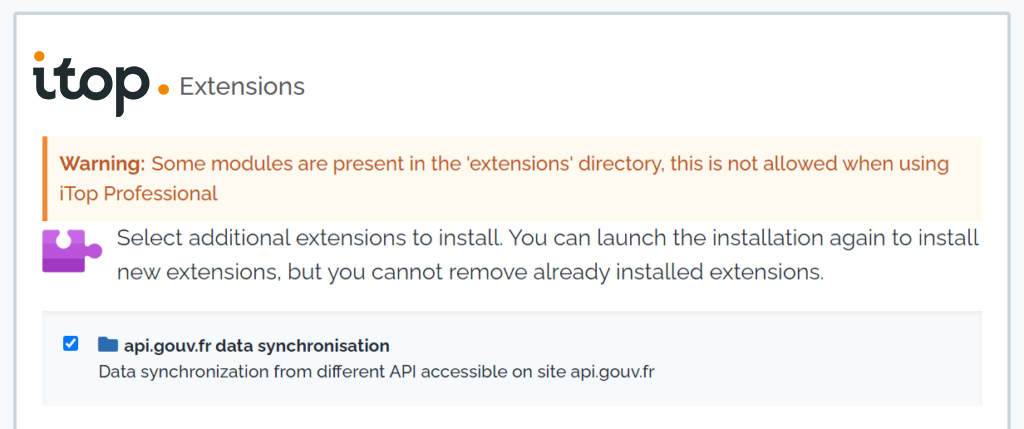
And that’s it! You can now host national education institutions in your iTop.
Try to create an institution to check that everything is up and running.
Navigate to the api.gouv.fr > National education establishments menu and click on create an establishment.
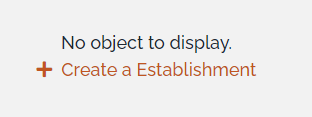
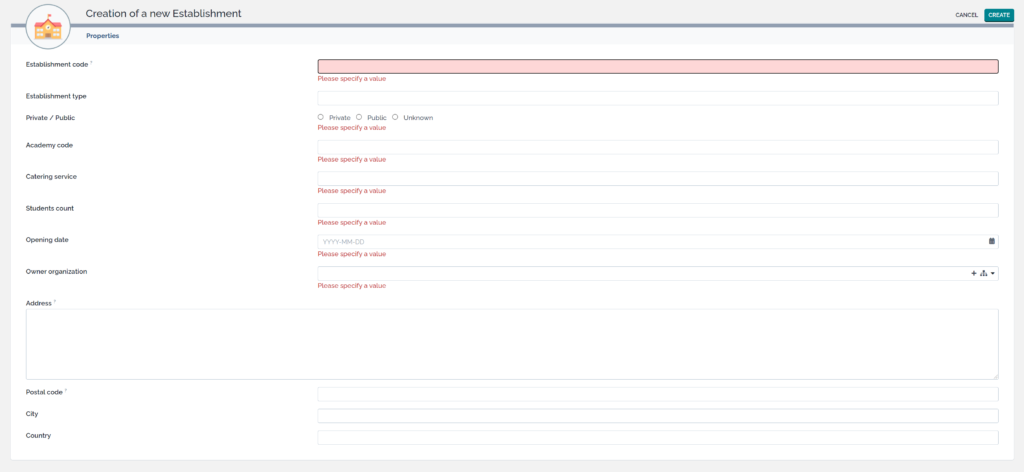
In the next chapter, we will see how to synchronise data using a collector.
3/ Creation of an iTop data collector
Installation iTop data collector
Download the extension data collector base.
And unzip the contents into a folder of your choice. (Do not unzip into the folder www of your server to avoid exposing its contents)
It is perfectly possible to unzip on another machine on the network as long as it has a PHP 7.x runtime environment.
Read all about Data collector base in our official documentation.
Data source configuration
Data source configuration is described in JSON format.
The easiest way to do this is to set up the data source in iTop’s console user interface and transform it into JSON format via a script provided by the iTop data collector extension.
Create a new data source in the configuration menu> sources of synchronisation data.
Enter the following information and leave the other fields unchanged.
Name: Synchro national education establishments
Description: https://api.gouv.fr/documentation/api-annuaire-education
Target class: Establishment
Contact to notify: Your_email
Datatable: data_national_education_establishment

Choose the attribute identified for reconciliation.
Choose the reconciliation key Full name for the Owner organization attribute, which will allow us to indicate the organisation by name and thus be more readable.
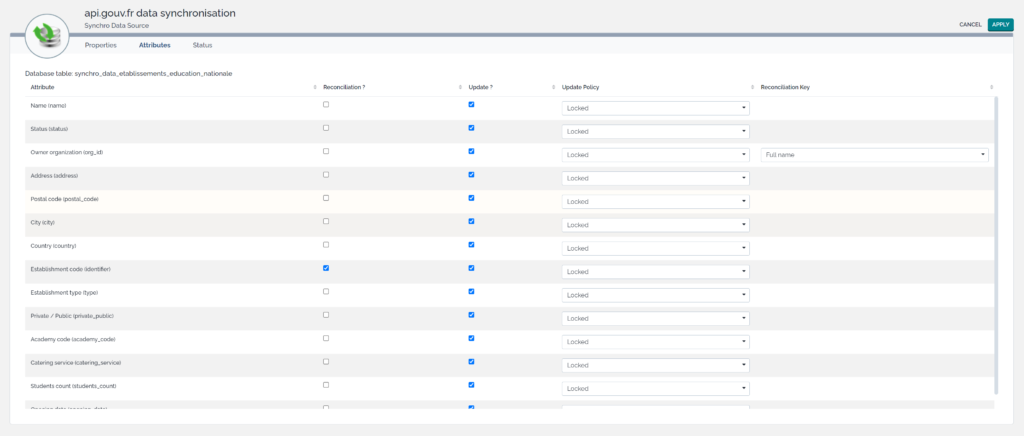
Then generate the JSON definition of this data source in the collectors directory.
php toolkit/dump_tasks.php --task_name="Synchro établissements éducation nationale" > collectors/DataEducationCollector.class.inc.json
For further information on this topic, please refer to our official documentation.
Collector settings
We need to prepare a settings file for the use of the collector.
Duplicate the configuration file params.distrib.xml and name it params.local.xml.
Update the configuration file with your settings as follows:
conf/params.local.xml
<parameters>
<itop_url>itop_server_url</itop_url>
<itop_login>your_login</itop_login>
<itop_password>your_password</itop_password>
<itop_login_mode></itop_login_mode>
<synchro_user>admin</synchro_user>
<contact_to_notify>your_email</contact_to_notify>
…
Collector class creation
Creation of the class DataEducationCollector derived from the class Collector.
The presence of curl has to be checked and you initialise it by deleting the old data collected.
DataEducationCollector.class.inc.php
class DataEducationCollector extends Collector
{
  /** @var array education establishment data */
  protected $aData = [];

  /** @var integer current process element */
  protected $iCurrent;

  /** @var integer fetched elements count */
  protected $idx;

  /**
  * Constructor.
  *
  * @throws Exception
  */
  public function __construct()
  {
    parent::__construct();

    // test curl presence
    if(!function_exists('curl_version')){
      throw new Exception('Curl is mandatory, check your PHP installation');
    }

    // initialization
    $this->init();
  }

  /**
  * Initialization.
  *
  * @return void
  */
  private function init() : void
  {
    // remove data files
    $this->RemoveDataFiles();
  }
}
•
Declare the main function for the API call.
This method returns a boolean to indicate that there is still data to collect.
You iterate by bunches of 100 elements (max defined by the API) and you limit yourself to 300 results for the moment.
DataEducationCollector.class.inc.php
class DataEducationCollector extends Collector
{
  …
  /**
  * Call rest api to acquire data.
  *
  * @return bool true if more data available
  */
  private function callRestApi() : bool
  {
    // open curl
    $oCurl = curl_init();

    // check limit
    $limit = 100;
    $max = 300;
    if($this->iCurrent + $limit > $max){
      $limit = $max - $this->iCurrent;
    }

    // construct API url
    $url = "https://data.education.gouv.fr/api/v2/catalog/datasets/fr-en-annuaire-education/records?limit=$limit&offset=$this->iCurrent";

    // curl options
    curl_setopt($oCurl, CURLOPT_URL, $url);
    curl_setopt($oCurl, CURLOPT_RETURNTRANSFER, true);
    curl_setopt($oCurl, CURLOPT_SSL_VERIFYPEER, false);

    // execute
    $aResult = json_decode(curl_exec($oCurl), true);
    echo "curl_exec: $url\n";
    curl_close($oCurl);

    // retrieve records
    $this->aData = $aResult['records'];
    $this->iCurrent += count($aResult['records']);

    // processing flags
    $hasMoreData = $this->iCurrent < $aResult['total_count'];
    $hasReachMax = $this->iCurrent >= $max;

    return $hasMoreData && !$hasReachMax;
  }
}
The basic mechanism of collection.
The prepare function is called to collect a batch and then the records of this batch are unstacked by adding them in csv files respecting a maximum data size.
You will repeat the process as long as there is data to be collected.
DataEducationCollector.class.inc.php
class DataEducationCollector extends Collector
{
  …
  /**
  * Prepare data.
  *
  * @return bool true if more data available
  */
  public function Prepare() : bool
  {
    // call rest API for new block of data
    $this->idx = 0;
    return $this->callRestApi(); // return true if more data available
  }

  /**
  * Fetch next block of data.
  *
  * @return bool|array current element data or false if no more data to fetch
  */
  public function Fetch()
  {
    // has something to fetch ?
    if ($this->idx < count($this->aData))
    {
      // next value to fetch
      $aElement = $this->aData[$this->idx++]['record'];

      // table conversion establishment private public enumeration
      $tableConvPrivatePublicEnum = [
        'Privé' => 'private',
        'Public' => 'public',
        '' => 'unknown',
      ];

      return array(
        'primary_key' => $aElement['id'],
        'identifiant' => $aElement["fields"]['identifiant_de_l_etablissement'],
        'name' => $aElement["fields"]['nom_etablissement'],
        'org_id' => $this->aSynchroFieldsToDefaultValues['org_id'],
        'address' => $aElement['fields']['adresse_1'],
        'city' => $aElement['fields']['nom_commune'],
        'postal_code' => $aElement['fields']['code_postal'],
        'country' => 'France',
        'status' => 'active',
        'type' => $aElement['fields']['type_etablissement'],
        'private_public' => $tableConvPrivatePublicEnum[$aElement['fields']['statut_public_prive']],
        'code_academie' => $aElement['fields']['code_academie'],
        'restauration' => $aElement['fields']['restauration'] == '' ? '0' : $aElement['fields']['restauration'],
        'nombre_eleves' => $aElement['fields']['nombre_d_eleves'] == null ? 0 : $aElement['fields']['nombre_d_eleves'],
        'date_ouverture' => $aElement['fields']['date_ouverture']
      );
    }

    return false; // no more data to fetch
  }

  /**
  * Collect data.
  *
  * @return bool true if data has been collected
  */
  public function Collect($iMaxChunkSize = 0)
  {
    $idx = 0;

    do{
      // block preparation
      $continue = $this->Prepare();

      // fetch elements...
      while ($aRow = $this->Fetch()) {
        if (($idx == 0) || (($iMaxChunkSize > 0) && (($idx % $iMaxChunkSize) == 0))) {
          $this->NextCSVFile();
          $this->AddHeader($this->aColumns);
        }
        $this->AddRow($aRow);
        $idx++;
      }
    }
    while($continue); // next block

    // cleanup
    $this->Cleanup();

    return $idx > 0;
  }
}
•
Collector registration
The next step is to declare the new collector to the orchestrator.
Create a file main.php to the root of the collectors folder and initialise it as follows:
collectors/main.php
Orchestrator::AddCollector(1, 'DataEducationCollector');
Launching the synchronisation
You can now trigger the synchronisation with the following command.
php .\exec.php
Browse the menu api.gouv.fr > National educational establishments.
You should get your 300 establishments synchronised.
4/ Industrialisation of the solution
We now want to finalise our solution by externalising parameters from our collector into the settings file.
Adding parameters
Add class members as follows:
DataEducationCollector.class.inc.php
class DataEducationCollector extends Collector
{
  const PRIMARY_KEY = 'primary_key';

  /** @var string rest API url */
  protected $sRestUrl;

  /** @var integer rest results amount limit */
  protected $iRestLimit;

  /** @var integer max elements to synchronize */
  protected $iMaxElements;

  /** @var array data columns */
  protected $aSynchroCols;

  /** @var array data translation */
  protected $aSynchroTranslation;

  /** @var array default values */
  protected $aSynchroDefaultValues;

  /** @var array class fields */
  protected $aSynchroClassFields;
  …

  /**
  * Initialization.
  *
  * @return void
  */
  private function init() : void
  {
    $this->iCurrent = 0;
    $this->iMaxElements = -1;

    // extract configuration values
    $this->extractConfigurationValues();

    // remove data files
    $this->RemoveDataFiles();
  }

  /**
  * Extract configuration values.
  *
  * @return void
  * @throws Exception
  */
  private function extractConfigurationValues() : void
  {
    // read configuration values
    $aConfigurationValues = Utils::GetConfigurationValue(strtolower(get_class($this)));

    // rest url
    if (array_key_exists('rest_url', $aConfigurationValues)) {
      $this->sRestUrl = $aConfigurationValues['rest_url'];
    }

    // rest limit
    if (array_key_exists('rest_limit', $aConfigurationValues)) {
      $this->iRestLimit = $aConfigurationValues['rest_limit'];
    }

    // max elements
    if (array_key_exists('max_elements', $aConfigurationValues)) {
      $this->iMaxElements = $aConfigurationValues['max_elements'];
    }

    // fields association
    if (array_key_exists('class_fields', $aConfigurationValues)) {
      $this->aSynchroClassFields = array(Self::PRIMARY_KEY => null);
      $this->aSynchroClassFields = array_merge($this->aSynchroClassFields, $aConfigurationValues['class_fields']);
      $this->aSynchroCols = array_keys($this->aSynchroClassFields);
    }

    // translation
    if (array_key_exists('translations', $aConfigurationValues)) {
      $this->aSynchroTranslation = $aConfigurationValues['translations'];
      foreach ($this->aSynchroTranslation as $key => $aTranslation) {
        $this->aSynchroTranslation[$key] = array_flip($this->aSynchroTranslation[$key]);
      }
    }

    // default values
    if (array_key_exists('defaults', $aConfigurationValues)) {
      $this->aSynchroDefaultValues = $aConfigurationValues['defaults'];
    }
  }

  /**
  * Call rest api to acquire data.
  *
  * @return void
  * @throws Exception
  */
  private function callRestApi() : bool
  {
    …
    // check limit
    $limit = $this->iRestLimit;
    if($this->iCurrent + $this->iRestLimit > $this->iMaxElements){
      $limit = $this->iMaxElements - $this->iCurrent;
    }

    // construct API url
    $url = "$this->sRestUrl?limit=$limit&offset=$this->iCurrent";
    …
  }

  /**
  * Fetch next data.
  *
  * @return bool|array current element data or false if no more data to tech
  */
  public function Fetch()
  {
    // has something to fetch ?
    if ($this->idx < count($this->aData))
    {
      // next value to fetch
      $aElement = $this->aData[$this->idx++]['record'];

      // fetched data
      $fetchedData = array();

      // fill values
      foreach ($this->aSynchroClassFields as $classField => $value) {
        if($classField == Self::PRIMARY_KEY){
          $fetchedData[$classField] = $aElement['id'];
        }
        else if(array_key_exists($value, $aElement["fields"]) && $aElement["fields"][$value] != ''){
          $fetchedData[$classField] = $this->getFieldValue($classField, $aElement["fields"][$value]);
        }
        else{
          $fetchedData[$classField] = $this->getFieldDefaultValue($classField);
        }
      }

      return $fetchedData;
    }

    return false; // no more data to fetch
  }
Versioning the collector
Create a module declaration file at the collectors folder root and initialise it as follows:
collectors/module.gouv-api-collectors-extension.php
__FILE__, // Path to the current file, all other file names are relative to the directory containing this file
'gouv-api-collectors-extension/1.0.0',
array(
  // Identification
  //
  'label' => 'api.gouv.fr API data synchronisation collectors',
  'category' => 'business',

  // Setup
  //
  'dependencies' => array(
    'gouv-api-extension/1.0.0'
  ),
  'mandatory' => false
  )
);
5/ Exercise on your own!
List of AFPA establishments throughout France
https://api.gouv.fr/documentation/api_etablissements_publics
Add a new entry in the sidebar menu.
6/ Quizz
– How to create an extension skeleton quickly
🔲 By creating it with a text editor
🔲 Thanks to the wiki pages
🔲 Based on another extension
– What is reconciliation?
🔲 The primary key of a class
🔲 Displaying the intelligible name of an object
🔲 One or a set of identifying attributes
– Where are translations of the text defined?
🔲 In the class tag of the data model
🔲 In the dictionaries tag of the data model
🔲 In the PHP function Dict::Add
– How to install an extension
🔲 With iTop hub
🔲 By running an installation script
🔲 By putting the extension in the extensions folder of the iTop server.
– How to release a version of your collector
🔲 By naming the folder with the version
🔲 By creating a module file
🔲 By pushing it to Git