Everything you need to know about
data collection and synchronization
Discover one of the simplest and most flexible solutions to automate data synchronization between your applications: the use of collectors.
What is a collector
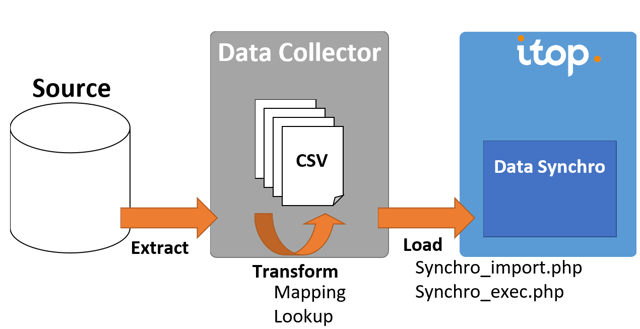
A collector is a stand-alone application which collects data from a source application and push them into iTop, on a regular basis, for example every day.
It is a simple ETL (Extract/Transform/Load) which enables data synchronization from a single external application.
Why should you use a collector
A few use cases
In the management of your services as well as in the overall organization of the information system, collectors are often useful.
They can be used, for example, to retrieve business data from another application. Take the example of retrieving customer invoices from applications such as Odoo, OVH, SAP or Salesforce in order to monitor service contracts.
This is what Combodo has done for its own needs with Odoo.
However, it can also be used for very different needs that are more related to infrastructure management. For example, synchronization of people in an organization from LDAP, retrieval of information related to the IT environment from VSphere or Azure.
Collectors' benefits
The use of a collector has many benefits:
- By avoiding duplication of data entry, it saves a large amount of time in the management of day-to-day operations, particularly when data is subject to regular change.
- Thanks to the automatic synchronization between systems, data quality is improved. The risk of errors is reduced, and there will be no more missing or obsolete information in iTop.
- Finally, data centralized in a single solution makes the information easier to read and use for all users.
Questions to ask yourself
Before starting, you need to ask yourself two questions: how and where to get the data.
How to retrieve the data
First, it is necessary to know which mechanism will help retrieving information from the remote application. This can be done via
- Directly querying the database in SQL
- WebServices REST (or others)
- CSV files
How to synchronize data with iTop
There are several ways to automate the synchronization of data in iTop:
- The use of unit REST WebServices by a program (creation, update and deletion of iTop objects)
- The use of a collector that implements data synchronization according to the mechanism described above
The answer depends on the frequency of collection, the volume of data and the development skills of your teams.
Indeed, in case of high frequency and volume, it is recommended to use synchronization by a collector rather than a WebService.
Where to collect the data
Another important point in the management of your data collection is to know where to install the collector to get the most out of its use, and to ensure that it works as efficiently as possible.
It is important to keep in mind that the collector is a standalone application, which will be run on a regular basis.
On the other hand, as the collector is the link between iTop and the other applications or databases of your information system, it is mandatory to make sure that it gets access to iTop's data source and web services.
The details of these steps and the creation of the collector are described in our official documentation.
Quick and secure option
Reuse collectors provided by iTop
You don't have enough time or resources to start developing a collector? You can rely on the collectors proposed by iTop, which are listed below 👇
It is also possible, in case of specific needs, to call upon iTop's professional services to help you with your project.
Fully customizable option
Develop your own collectors
You want to remain autonomous and develop your own data collection? It is possible.
To make it easier for you, we have created an SDK, Data collector Base, which can be used as a basis for creating any type of collector. However, it is important to follow the implementation steps described in the documentation: installation, general configuration and data sources
Full example of creation of a collector
The objective of this example is to synchronise the National Education institutions with iTop.
By following this tutorial, you will understand how to structure the data, create an extension and a collector to implement this collection.
Automate assets management with OCSng
With the Data Collector for OCSng and the Data model for OCSng, infrastructure items identified by OCSng are automatically filtered by category and synchronized in iTop.
Watch the video to know more about it.
Microsoft Azure CMDB in iTop
To simplify the management of your IT inventory and view your Microsoft Azure and iTop CMDBs in a single consolidated view, we have developed two combined extensions to allow you to generate the data model and retrieve classes and attributes from Azure.
Watch the demo webinar to know more about it.
You use CSV files? No worries!
This step-by-step tutorial helps you create a collector to retrieve data from your CSV files and consolidate everything into iTop.
iTop collectors
Looking for a collector? Before you start developing, take a look at our collectors.
Data synchronization dashboard
This extension provides an extra menu that provides a quick overview to check the health of the running data synchronization sources.
This extension is a must when you use many collectors.
Data collector Base
Data collector Base API is a toolkit (SDK) providing the basis for creating a powerful data collection and synchronization application for iTop.

Data collector for LDAP
Data collector for LDAP helps you manage your organisation by collecting information about Persons and Groups from your LDAP/ActiveDirectory
It synchronizes Persons, Users and optionally Profiles in iTop and creates automatically the required Synchronization Data Sources.
Data collector for Microsoft Graph
Data collector for Microsoft Azure
Data collector for Microsoft Azure enables administrators to automatically feed iTop with relevant and accurate Microsoft Azure cloud computing information.
The Data collector for Azure relies on Data model for Microsoft Azure where Azure objects are modelized for iTop. It cannot be used independently.

Data collector for VSphere
Data collector for vSphere enables administrators to automatically feed iTop with relevant and accurate information about a whole data center from a vSphere server.
Data collector for OCSng
This stand-alone application collects information about PCs, Servers and Virtual Machines from an OCS Inventory server and synchronizes this information with iTop.
The Data collector for OCSng relies on Data model for OCSng where objects are modelized for iTop. It also adds a direct link to OCS Inventory objects from iTop. It cannot be used independently.
IP discovery collector
TeemIp IP Discovery provides a solution to TeemIp administrators to discover or scan their IP networks and to document within TeemIp and iTop when connected the results of these discoveries and scans.
The IP collector relies on IP Discovery extension that adapts TeemIp's standard data model to store the discovery outputs and enables communication between a TeemIp instance and the different discovery engines deployed on the network.
Data collector for Ansible
Ansible IT automation platform helps with continuous deployment and configuration. The integration between iTop CMDB and Ansible centralizes Ansible inventories of remote systems in iTop and ease their management.
Ansible can collect a lot of information about the elements of and information system. Data collector for Ansible enables administrators to automatically feed iTop with relevant and accurate information gathered by Ansible.